Video Annotation Services

Whenthestoryisinthemovement,framebyframematters.

Video is labelled as a story that has to stay true: persistent identities through occlusion, actions with agreed start and end frames, and pixel or pose layers that are reviewed on playback — not as a pile of unrelated stills.

Video annotation labels objects, actions and events across consecutive frames, keeping a persistent track ID for each object and agreed start and end frames for each action. VIPRO reviews tracks on playback in two QA stages and delivers formats such as CVAT XML and COCO JSON.

VIDEO / CAM_03 · 24 FPSREVIEW PASS · 000%
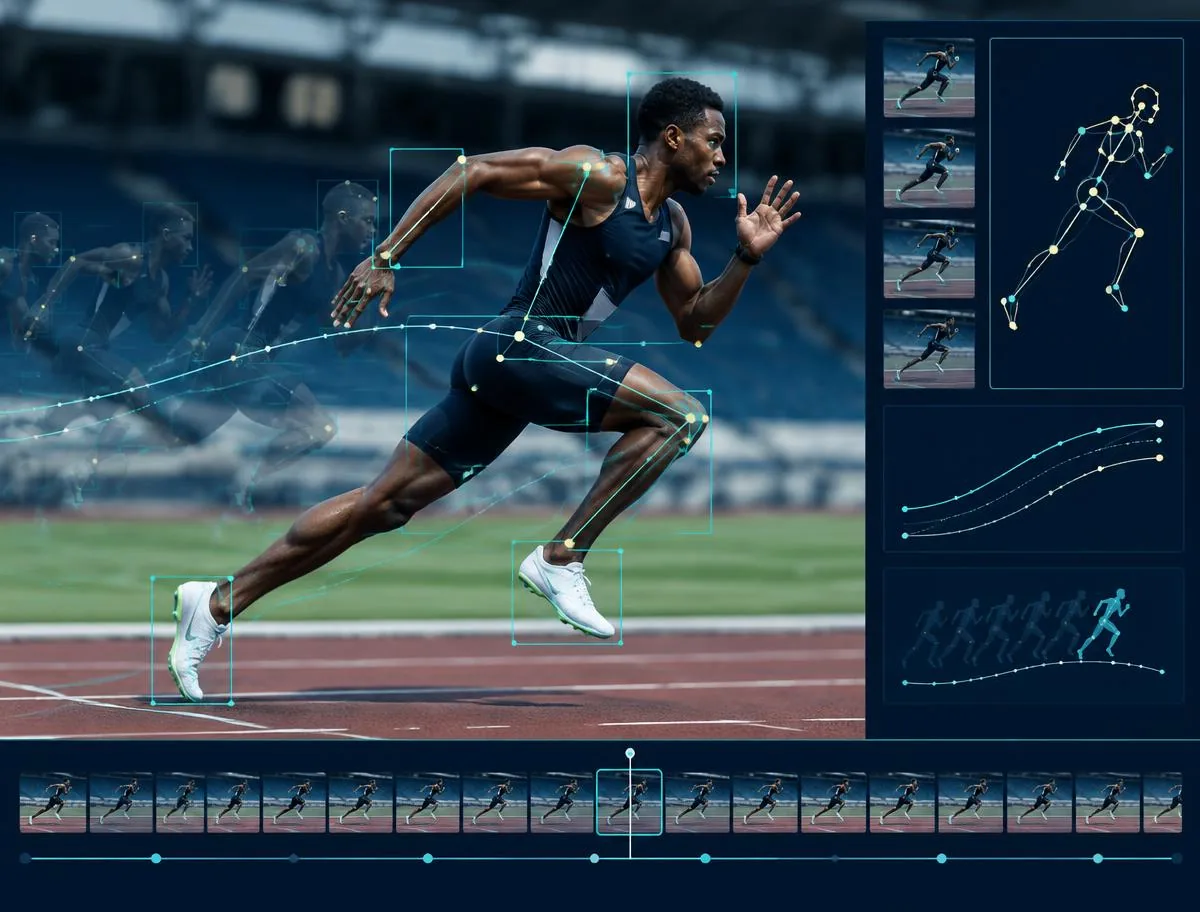
POSE / SPRINT_07
Sprinter with pose keypoints tracked across frames

Compatible workflows

Tools we can work with

  • CVAT logo
  • Labelbox logo
  • Roboflow logoRoboflow
  • Label Studio logo
  • Encord logo
  • Scale AI logo
  • SuperAnnotate logoSuperAnnotate
  • Darkhorse

Start smaller than the backlog

Test the difficult transitions first.

A short sequence reveals tracking gaps, identity switches, camera changes, and event boundaries before scale adds complexity.

Pilot first

What a video delivery contains

Sequences ship with persistent IDs, event tables, and the sampling rule that was used. You can replay a track against the source. If we interpolated, that fact is visible rather than hidden inside a smooth overlay.

  • Track files with persistent IDs
  • Frame attributes and scene tags
  • Action / event span tables
  • Pose sequences
  • Optional mask or polyline layers

Interactive example

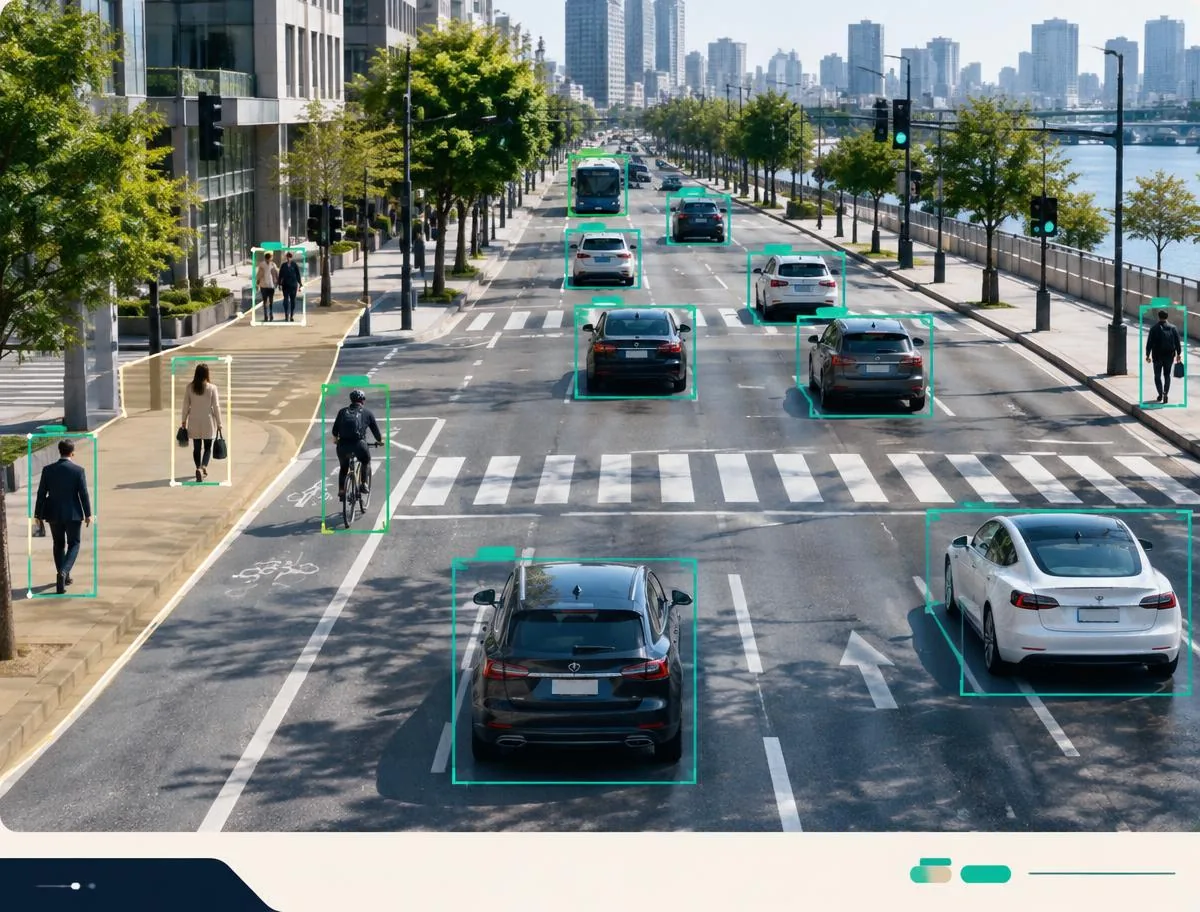
See object identity persist across frames

Play the source clip, inspect track paths, or hide overlays to compare the raw sequence with structured output.

VIDEO / INTERSECTION_024TRACKING

Temporal annotation guide

Video techniques that still make sense after the subject has moved

Tracking, pose, lines, and pixel classes can all live on a timeline. The useful question is which of them still means the same thing after an occlusion, a cut, or a change of light — and how we review that on playback, not on a single pinned frame.

01

Video annotation for medical imagery

SkeletonSemantic masksBounding boxes

Clinical teams mark different parts of the body and the findings that belong with them, frame by frame. Skeleton tools, semantic masks, polygons, and bounding boxes can all sit on the same study.

That combination shows how anatomy, a tumor, a bone, or another abnormality moves and changes, instead of treating each frame as a separate picture.

02

Bitmask annotation for shapes

BitmasksShape libraryKeypoints

A bitmask labels a shape by its pixels, so repeated objects can be marked quickly without redrawing every edge. A saved mask library can highlight the object that matters or cover the region that should stay out of the training signal.

Keypoints can record size, including radius, and the points can be joined so the outline still follows the object as it turns or changes scale.

03

Video annotation with lines

PolylinesLane boundariesTopology

Lines are used for roads, pipelines, cables, and other features that are defined by a path rather than a filled shape. Semantic regions and a skeleton can be added when the model also needs the surrounding structure.

The same method can mark a safe driving line, a building edge, or the relationship between parts of a plan.

04

Skeletal video annotation

PoseKeypointsLimb tracking

A skeleton makes body movement readable. Annotators place keypoints on the person and connect them, so each frame records how the limbs are arranged at that moment.

The result is useful wherever pose matters, including sport, work, and other physical activity.

05

Custom annotation for robotics

Custom ontologyGrasp targetsMotion paths

Robotics work usually needs a label set built for the task, such as an arm reaching for a part and the objects around that grasp. The ontology can name the target, the gripper state, and anything the robot must avoid.

The same custom setup can be adapted for other sites and equipment once the task and the review rules are agreed.

06

Video annotation for inventory management

Semantic masksItem classesShelf regions

Semantic masks separate products, shelves, and empty space so a model can tell what is in stock without a person walking the floor.

Consistent item and region labels turn warehouse footage into training data for counting, finding, and replenishing stock.

07

In-cabin driver monitoring

Facial keypointsGazeFatigue

Keypoints on the driver and face show gaze, eyelid state, and posture across long in-cabin recordings, including signs that a driver is falling asleep.

The same labels can support models that watch for unsafe behavior, coach a new driver, or recommend when attention is dropping.

08

Semantic segmentation on video

Pixel classesScene regionsChange detection

Every pixel in the frame is given a class, so sky, ground, trees, buildings, vehicles, and people stay separate as the camera moves.

That class map is what scene and disaster models use to tell related regions apart, including flooded ground or a damaged structure.

09

Instance segmentation

Instance masksObject IDsPolygons

Each object of the same class receives its own mask, so one person, animal, or item is not merged with the next.

Agriculture, search, and inspection models use that separation to count and follow individual subjects, including from drone footage.

Quality on this modality

Video quality is continuity you can replay.

We watch the sequence. If an identity swaps, if an event starts late, if interpolation invents a path through a wall, the item is not done — even if every sampled frame has a shape.

Identity continuity

Track IDs are checked at occlusions, cuts, and crowd crossings. A new ID needs a reason, not a tired annotator.

Interpolation honesty

Filled frames are sampled. If the interpolated box no longer contains the object, the span is rebuilt rather than trusted.

Event timing

Start and end frames are compared against the written examples. Drift of a few frames is often the whole error for an action model.

Temporal density

Key-frame, dense, or event-led sampling is the rule you chose — not a mix invented mid-project to go faster.

Video Annotation

Where motion and timing matter

Four places this work earns its keep. Read them as scenes, not as a pile of chips.

  1. 01Traffic and roadway behaviour
  2. 02In-cabin and workplace monitoring
  3. 03Sport and performance
  1. Traffic and roadway behaviour

    Vehicles, riders, and pedestrians through junctions, weather, and partial views. The value is a track that still means the same road user after a bus passes.

  2. In-cabin and workplace monitoring

    Gaze, posture, and hand actions over long recordings. Fatigue and unsafe motion are labelled as states with timing, not as a single dramatic frame.

  3. Sport and performance

    Players, ball, and events that only exist as a sequence — a pass, a tackle, a serve. Pose and identity have to agree or the tactical model learns ghosts.

Questions that belong only here

Ask these before this work scales.

01

Occlusion and reappearance rules are written with clips, not adjectives. Reviewers scrub the crossings. When two annotators assign different IDs, the item is a calibration case, not a coin flip.

02

Yes. Key frames, a fixed stride, or event-led density are all valid if they match the model task. We will not silently switch from dense to sparse to hit a date.

03

Possible when the brief says whether identity is shared. Synchronisation, overlapping fields of view, and the rule for a person who leaves one camera and enters another are agreed before tracking starts.

04

We pick an operational definition — first contact, first clear intent, last return to rest — and we keep examples next to it. Sequences that still do not fit are escalated instead of being given a decorative timestamp.

05

Yes, as a draft. A person still walks the interpolated span. Tools that skip that walk produce confident nonsense in crowds and at cuts.

06

Short sequences that contain a disappearance, a crossing, a lighting change, and one action whose start is arguable. Those four things tell us more than an hour of easy footage.

Model-assisted pre-labels

AI-assisted video labeling

Where it helps, a model can propose pre-labels, for example boxes on a familiar class. A person still accepts, corrects or rejects every pre-label against the written guide, and novel classes start from a human hand. Automatic output that never meets a reviewer is not a VIPRO delivery.

Identity over time

Multi-object tracking and persistent track IDs

A video label isn't a stack of independent image labels. Its value is the claim that the object in frame 40 is the same physical object as the one in frame 4,000. Tracking work is about protecting that claim, frame after frame.

What a track ID promises

Each object gets one track ID when it first appears, and that ID never moves to anything else. If a forklift leaves the scene and a different forklift drives in, the newcomer gets a new ID, even if it looks identical. If the same person walks behind a pillar and comes out again, they keep their original ID. The guideline writes down which of these cases count as the same object for your project and how annotators decide when they can't be sure.

IDs are unique within a clip, never reused after an object has been retired, and kept consistent across every layer: the box, the pose skeleton and any attributes all point to the same identity.

Crowded and fast-moving scenes

Dense scenes such as crowds, traffic queues, shelves, or players clustered around a ball are where tracking errors pile up. We split these clips into smaller segments for annotators, overlap the segment edges so identities can be handed over, and have a reviewer confirm every ID across each segment boundary before the clip is put back together.


Tracking crowded, fast play is covered in our sports video annotation guide.

Re-identification

Zero ID switching across occlusion: an audited quality target

Zero ID switches is the target we audit every tracked clip against. It is a quality target with a measured result, not a guarantee. Some footage is genuinely ambiguous, and an honest dataset flags those moments instead of hiding them.

How re-identification after occlusion is handled

When an object is hidden, its track stays open and is marked occluded rather than ended. When something reappears, the annotator checks it against open tracks using position, direction of travel, size, appearance and timing before attaching it to an existing ID. The guideline sets how long a track can stay hidden before a reappearance needs a reviewer's sign-off.

If identity can't be decided from the footage, the annotator doesn't guess. They flag the moment, and the reviewer either resolves it or keeps it flagged as ambiguous in the delivery, so your team knows exactly where uncertainty sits.

How switches are audited

Reviewers play back each track as a continuous path rather than checking single frames. An ID switch is logged whenever one ground-truth object's ID changes, or two objects swap IDs. Fragmentations, where one object's track breaks into several IDs, are counted separately. Both are reported per clip, alongside the reviewer's notes on each case.

Efficiency without drift

Keyframe interpolation versus labelling every frame

Interpolation is a tool for saving cost. It isn't a shortcut on quality. Used in the right place it cuts annotation time a lot. Used in the wrong place it quietly produces boxes that slide off the object.

When to interpolate

Interpolation works when motion between keyframes is smooth and predictable: a car cruising at steady speed, a person walking across a fixed camera's view, a parcel on a conveyor. The annotator places keyframes where motion changes, and the tool fills in the frames between.

When to label every frame

Fast direction changes, sudden scale changes, camera shake, deforming objects such as hands, and moments of contact or occlusion all need denser keyframes, often one on every frame. Egocentric and sports footage spend much of their time in this zone, so their guidelines set a much tighter keyframe spacing.

Correction passes

After interpolation, a correction pass scrubs through every generated frame and checks the box or polygon still fits the visible object. Wherever it drifts, the annotator adds a keyframe rather than nudging single frames. That way the fix carries through to the frames around it and the track stays smooth.

Temporal labels

Event and action boundaries: start frame, end frame, tolerance

Action labels sound simple, like 'pick up' or 'pass'. But two careful annotators will disagree by several frames on where an action begins unless the rule is written down.

Start and end frame rules

Each action class gets a written onset and offset definition tied to something you can see. For example, a pick-up starts on the first frame of hand–object contact and ends on the frame the object is fully lifted clear of its surface. Ambiguous lead-in movement is either part of the action or excluded from it, and the guideline says which.

Rules also cover overlapping actions, interrupted actions that resume, and the smallest gap between two separate instances of the same action.

Boundary tolerance

During calibration we agree a boundary tolerance with you, a window of frames within which a start or end point is accepted as correct. Review then measures boundaries against that tolerance instead of demanding an exact frame match no human could reproduce.

First-person action boundaries are explained in egocentric video annotation, and applied at scale in the factory egocentric case study.

Frame rate

Frame rate and sampling choices

How many frames get labelled drives cost more than any other single decision in a video project, and it should come from what the model needs, not from the camera's native frame rate.

Choosing a sampling rate

Detection models trained on video often need only sampled frames, a few per second, because neighbouring frames are nearly identical. Tracking models need continuous sequences so identities can be learned across time. Action and fine-motion models usually need the full native rate around the events themselves.

A common pattern is mixed sampling: sparse frames across quiet stretches and full frame rate in windows around events of interest. We agree the scheme in the pilot and document it in the delivery so your training pipeline knows which frames carry labels.

What gets labelled

Object, pose and pixel layers

One clip can carry several layers of annotation. Each layer gets its own guideline section and review pass, all tied to the same track IDs.

Object layer

Tracked boxes or polygons with class, occlusion and truncation attributes on every frame. This is the base layer that pose and pixel work build on.

Pose layer

Body, hand or object keypoint skeletons, with a visibility value per point on every frame. Pose tracks inherit the object track's ID, so each skeleton always belongs to the right person.

Pixel layer

Per-frame segmentation masks for objects or scene regions, when the model needs exact shape over time. Masks are checked for temporal consistency, so edges shouldn't flicker between frames when the object hasn't moved.

Quality control

How tracks are reviewed before delivery

Video QA happens on playback. A box can look perfect on every single frame and still belong to the wrong object halfway through the clip.

Two-stage review

Annotators self-check each track on playback before submitting. An independent reviewer then audits a sample of every batch. They check identity continuity, box fit on interpolated frames, attribute changes and event boundaries against the written rubric.

Errors are logged by type: ID switch, fragmentation, missed object, extra object, geometry drift, wrong attribute and boundary outside tolerance. Batches that miss the agreed threshold go back for rework, and recurring edge cases are added to the guideline.

Delivery

Delivery formats for video annotation

We deliver in the format your pipeline already reads, so nobody on your team has to write a converter.

Common formats

CVAT XML with tracks and per-frame shapes, COCO-style JSON with video and track fields, MOT-style CSV rows of frame, track ID and box, and temporal action JSON with start and end times. Custom schemas are agreed during calibration and checked against your loader before full production starts.

Inspect Sample Deliverable & QA Rubric

Illustrative sample
<!-- Illustrative sample — not client data -->
<annotations>
  <track id="7" label="forklift">
    <box frame="120" xtl="412" ytl="260" xbr="600" ybr="402" outside="0" occluded="0" keyframe="1"/>
    <box frame="128" xtl="455" ytl="262" xbr="641" ybr="404" outside="0" occluded="1" keyframe="1"/>
    <box frame="140" xtl="520" ytl="265" xbr="706" ybr="407" outside="0" occluded="0" keyframe="1"/>
  </track>
</annotations>

Stage 1 — Annotator self-check

  • Every in-scope object tracked from entry to exit
  • One persistent ID per object; reappearances checked
  • Interpolated frames scrubbed and corrected
  • Event start and end frames follow the written rule

Stage 2 — Independent reviewer audit

  • Independent reviewer audits tracks on playback
  • ID switches and fragmentations counted per clip
  • Boundaries checked against the agreed tolerance
  • Failed batches returned for rework before delivery

Video annotation technical FAQ

When do you use keyframe interpolation instead of labelling every frame?

We interpolate when motion between keyframes is smooth and predictable, then run a correction pass over every generated frame. Fast direction changes, deforming objects, camera shake and occlusion get dense keyframes, often one on every frame. The keyframe spacing per class is agreed during calibration.

How are ID switches detected and counted?

Reviewers play back each track as a continuous path. An ID switch is logged whenever one real object's ID changes or two objects swap IDs. Fragmentation, where one object's track breaks into several IDs, is counted separately. Both are reported per clip. Zero ID switches is an audited quality target, not a guarantee.

How do you handle occlusion and objects re-entering the frame?

A hidden object's track stays open and is marked occluded instead of being closed. On reappearance, the annotator matches it to open tracks by position, motion, size, appearance and timing. Long gaps need reviewer sign-off, and cases that can't be resolved are flagged as ambiguous in the delivery rather than guessed.

What rules define the start and end of an event or action?

Each action class has a written onset and offset tied to a visible cue, such as first hand–object contact. The rules also cover overlapping, interrupted and repeated actions. Boundaries are reviewed against a frame tolerance agreed during calibration, not an exact frame match.

How does frame rate affect the cost of video labelling?

Cost goes up roughly with the number of frames that need checked labels, so sampling matters more than any other choice. Detection often needs only sampled frames. Tracking needs continuous sequences, and fine actions need native frame rate around events. Mixed sampling, sparse in quiet stretches and dense around events, usually gives the best balance.

Test us on your hardest clips first.

Start with a Free Calibration Pilot

Start a conversation

Send the clip where someone disappears.

A crossing, a cut, an action whose start is arguable. That sequence is the brief. Easy footage can wait.

Request a Quote